Get Certified for Financial Modeling (FMVA)®
Gain in-demand industry knowledge and hands-on practice that will help you stand out from the competition and become a world-class financial analyst.
This article gives you a free Sales Tax Decalculator template to use in Excel.
A sales tax decalculator will tell you the pre-tax price of a good or service when the total price and tax rate are known.
You can download our free Excel template to determine the pre-tax price.
The Excel sales tax decalculator works by using a formula that takes the following steps:
Step 1: take the total price and divide it by one plus the tax rate
Step 2: multiply the result from step one by the tax rate to get the dollars of tax
Step 3: subtract the dollars of tax from step 2 from the total price
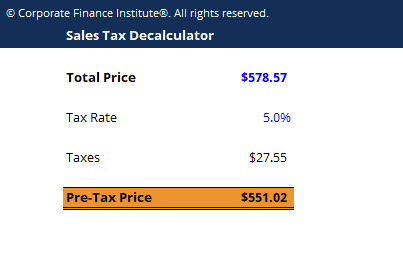
Here is the formula for decalculating the tax or determining the pre-tax price of the good/service.
Pre-Tax Price = TP – [(TP / (1 + r) x r]
Where:
TP = Total Price
r = Tax rate
These types of formulas and functions are covered in detail in our free Excel crash course.
Thank you for reading CFI’s guide to the Excel sales tax decalculator. If you want to become an Excel power user, please check out our Excel Resources to learn all the most important functions, formulas, shortcuts, tips, and tricks.
To master the art of Excel, check out CFI’s Excel Crash Course, which teaches you how to become an Excel power user. Learn the most important formulas, functions, and shortcuts to become confident in your financial analysis.
Launch CFI’s Excel Crash Course now to take your career to the next level and move up the ladder!


