Our corporate training program will fill any pre-existing knowledge gaps and teach the most in-demand industry skills, from accounting to financial modeling training.
Benefits of Excel Training for Employees: Faster Reporting, Fewer Errors, Better Decisions
Excel remains one of the most relied-on tools for analysis, forecasting, and reporting across finance, operations, HR, and administration. 84% of finance professionals say Excel will be equally important or more important over the next 10 years, according to a 2025 survey by Datarails.
Yet many employees learn Excel on the job, picking up habits through trial and error rather than structured training. Some employees can build complex models with confidence, while others need more support with formulas, shortcuts, and spreadsheet best practices.
Formal Excel training changes that. It gives your team a shared foundation, helps employees build faster workflows, and improves the reliability of everyday spreadsheet work. This article breaks down the benefits of Excel training for employees and teams, covering productivity, accuracy, collaboration, decision-making, and what to look for in a program that delivers real ROI.

Excel as a Core Business Skill Across Industries
Excel is one of the few tools that almost every department relies on to organize data, run analysis, build reports, and share information. It serves as a common format for teams to review and discuss data, from planning workbooks shared between finance and leadership to reporting templates used across departments.
The way teams use Excel varies, but the dependency is consistent. FP&A teams use it for budgeting, forecasting, variance analysis, and scenario planning. Accounting teams use it to reconcile accounts, prepare schedules, and support the month-end close. Operations teams track inventory, costs, and process metrics. HR teams analyze workforce data, compensation trends, and training participation. Sales and administrative teams manage pipelines, performance reports, and schedules.
That broad usage makes skill consistency matter. When employees have different levels of Excel proficiency, it creates friction. Files get rebuilt, formulas need checking before anyone trusts the numbers, and work gets routed to the one or two people most comfortable with Excel. Addressing skills gaps in your finance team often starts with looking at the tools, like Excel, that your team uses every day.
Self-taught Excel skills can take employees a long way, but with uneven results. Structured Excel training gives your team a shared foundation, fills gaps left by informal learning, and helps employees use Excel more confidently in their everyday work.
Key Benefits of Excel Training for Organizations
The benefits of Excel training for employees become easier to measure when stronger skills translate into day-to-day work. Employees can complete recurring tasks faster, analyze information with more confidence, and reduce the back-and-forth that often slows down reporting and planning.
The following benefits show how structured Excel training can improve both individual performance and team-level results.
Improved Efficiency and Productivity
Many employees use Excel manually, even when faster methods are available. They copy and paste data between files, rebuild recurring reports from scratch each month, or spend time on formatting and cleanup steps that could be simplified.
Excel training helps employees replace those manual steps with faster, more reliable methods:
- Excel functions for data preparation enable employees to calculate, clean, and summarize data without rekeying.
- Templates standardize recurring reports so teams don’t have to rebuild the same file every month.
- Macros automate repetitive tasks such as formatting, cleanup, and report preparation.
- Advanced functions such as XLOOKUP, SUMIFS, PivotTables, and Power Query help employees analyze and reconcile data more efficiently.
The business impact shows up in reporting cycles and month-end close processes. When employees can pull, organize, and summarize data more efficiently, reports get finished faster. Finance teams spend more time on review and analysis and less on spreadsheet mechanics. For organizations looking to drive process improvement for finance teams, stronger Excel skills are often one of the most practical places to start.
Enhanced Data-Driven Decision Making
Most teams have more data than they know what to do with. The real challenge is turning raw data into clear, actionable insights that inform decision-making. Excel training helps employees make that shift by teaching them to clean and structure spreadsheet data, identify patterns, and connect what the numbers show to the business questions their team is actually asking.
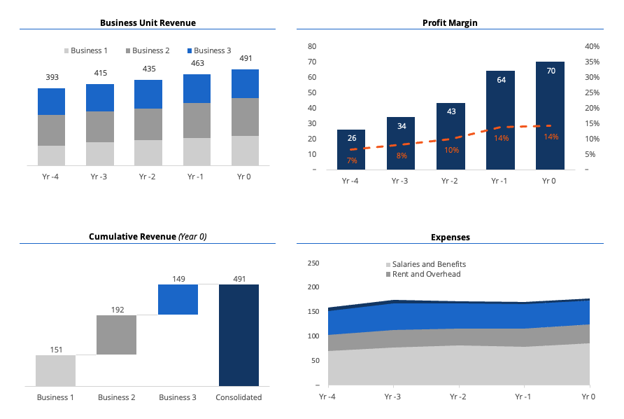
Data visualization tools play a big role in that process. Excel charts, conditional formatting, and dashboards help employees present complex data in a format that managers, executives, and cross-functional partners can quickly understand. A well-built dashboard can turn a dense spreadsheet into a clear summary of where things stand, what’s changed, and where attention is needed.
Excel training builds the technical foundation employees need to take on more advanced analytical work, including financial modeling, forecasting, and scenario analysis:
- Finance teams apply these skills to evaluate changes in revenue, costs, or cash flow.
- Operations teams model capacity and inventory needs.
- HR teams forecast staffing requirements and analyze compensation data.
When more employees can build models and dashboards independently, senior analysts don’t have to handle every advanced request themselves. Teams can move faster as a result.
Reduced Errors and Improved Data Integrity
Excel errors are more costly than they might appear. A broken formula, an incorrect cell reference, or an outdated input can produce numbers that look right but aren’t. In finance contexts, that kind of error can affect forecasts, budgets, or financial schedules and require significant rework to correct.
Excel training helps employees shift from catching errors after something breaks to building spreadsheets that are easier to check and harder to misuse:
- Data validation allows employees to control what gets entered into a cell, limiting inputs to approved categories, date ranges, or numerical values before incorrect data affects downstream formulas.
- Formula auditing gives employees tools to trace how values flow through a workbook, identify broken links, and verify that formulas are calculating what they’re supposed to.
- Structured workbook design teaches employees to separate inputs, calculations, and outputs, use clear labels, and organize files so others can follow and review them.
Standardized practices across a team reinforce these gains. When employees use consistent workbook structures and naming conventions, formula inconsistencies are easier to spot. Training also helps employees recognize formula rot, which occurs when formulas become outdated, overly complex, or disconnected from how the business uses the file.
For finance teams, these practices have direct implications for compliance and audit readiness. Well-structured, clearly documented workbooks are easier to audit, hand off, and update when requirements change.
Better Team Collaboration and Standardization
Excel files rarely stay with one person. They get passed between team members, shared with managers, handed off during role transitions, and pulled into cross-functional projects. When everyone on a team has developed their own spreadsheet habits, that movement creates friction and slows everyone down.
Organization-wide Excel training addresses this by creating a shared foundation. Employees learn common practices for organizing workbooks, documenting assumptions, formatting outputs, and preparing files for review. Training doesn’t mean every spreadsheet looks identical, but it means employees understand the same basic expectations, so files are easier to follow regardless of who built them.
Standardized templates, naming conventions, and modeling approaches put that shared foundation into practice:
- Templates eliminate the need to rebuild recurring reports from scratch and give reviewers a familiar structure to work from.
- Consistent naming conventions help people find the right information without asking.
- Shared modeling approaches, where inputs, calculations, and outputs are organized consistently, make it easier for others to follow a file’s logic.
Building high-performing finance teams often depends on this kind of operational consistency as much as it depends on individual skill.
These standards pay off most clearly during onboarding and cross-functional work. New hires get up to speed faster when files follow familiar structures. Cross-functional teams spend less time interpreting reports when layouts and terminology are consistent across departments.
Increased Employee Confidence and Engagement
Many employees use Excel every day but still feel uncertain when a task pushes beyond their comfort level. Building a formula from scratch, troubleshooting an error, or preparing an analysis for a manager can feel stressful when skills were developed informally. Excel training gives employees practical techniques they can apply right away, which reduces that uncertainty.
That confidence directly connects to engagement. Employees who feel equipped to do their jobs well are more likely to take initiative, participate actively in team workflows, and invest effort in the work in front of them. Practical training reinforces that feeling because the skills transfer immediately to real tasks.
Training also sends a clear signal to employees that the organization values their development. When employers invest in practical skill-building, employees can see that their growth matters. That kind of investment can contribute to job satisfaction and help employees recognize opportunities to take on more advanced projects or move into roles that require stronger analytical skills.
For employers, the value of these outcomes is straightforward. Engaged employees are better positioned to contribute, solve problems, and take on higher-value work.
Improved Retention and Talent Development
Excel skills often underpin some of the most important responsibilities in finance, accounting, FP&A, and operations. Employees who can build reliable reports, analyze data independently, and support planning processes are better positioned to take on more advanced work over time.
Skill development can support retention by demonstrating that the organization is invested in employees’ growth. Upskilling and reskilling programs signal that the organization sees long-term value in its people, which can strengthen that connection and reduce turnover over time.
The cost-benefit case for training is straightforward. Replacing an experienced finance professional involves:
- Recruiting costs and onboarding time.
- A productivity gap while the new hire gets up to speed.
- The loss of institutional knowledge that a previous employee took with them.
Training existing employees costs a fraction of that.
Excel expertise also prepares employees for more senior responsibilities. At the manager and director level, professionals need to review financial models, interpret analytical outputs, challenge assumptions, and guide decisions based on data. Strong Excel skills help employees build the foundation those roles require.
Transferable skills can also strengthen loyalty when offered as a meaningful part of a development program. Employees recognize when an organization invests in skills that have real professional value, and that recognition can build trust and reinforce a sense that their growth is supported.
How Employees Benefit from Excel Training
The benefits of Excel training for employees extend beyond the organization, giving individuals practical skills they can use right away and build on throughout their careers. That makes training feel like a genuine investment in professional growth rather than just a job-specific requirement.
Employees who build strong Excel skills carry them from role to role and company to company. Whether they move into a different department, take on a new function, or transition to a different industry, Excel proficiency remains relevant.
Career advancement is another area where Excel skills make a measurable difference. In finance and accounting, senior roles often require employees to own reporting processes, review financial models, lead budgeting and forecasting cycles, and present analysis to leadership. The Excel courses offered by Corporate Finance Institute (CFI) are designed to help finance professionals develop the skills required for senior roles, from basic functions to advanced modeling techniques.
Training also increases employees’ confidence and independence when handling complex projects. Rather than relying on a more experienced colleague to troubleshoot a formula or build out an analysis, trained employees can work through those challenges on their own.
For employees pursuing professional development goals, completing structured Excel training can also lend credibility. A certificate or formal credential gives employees something tangible to point to when discussing growth with a manager or updating a professional profile.
What to Look for in an Excel Training Program
When evaluating Excel training programs, L&D and finance leaders should look beyond the course title or number of lessons. The best finance training for teams connects Excel skills to real-world needs, supports diverse experience levels, and gives organizations a practical way to track progress.
Key criteria include:
- Skill progression and role-specific content: Structured learning paths from Excel fundamentals to advanced techniques, with examples tied to the work employees actually do.
- Real-world business application: Programs that help employees build practical deliverables, such as financial models, dashboards, and reporting files.
- Flexible delivery options: Various formats, such as self-paced, instructor-led, or hybrid, that fit around finance deadlines and day-to-day workloads.
- Enterprise tracking and administration: Admin dashboards, completion tracking, reporting, and integration with existing learning systems.
- Certifications and continuing professional education: Programs that offer finance team certifications, CPE credits, or completion certificates that support employee development goals.
Together, these criteria help leaders choose Excel training that improves skills while supporting the practical needs of employees and the organization.
Why CFI Excel Training Delivers Fast ROI for Finance Teams
CFI Excel training is designed to help finance teams build practical skills they can apply quickly. More than 75% of learners report improved productivity or competency within weeks, giving leaders a clear starting point for evaluating the impact of training.
For teams that need faster reporting, stronger analysis, and more consistent Excel skills, CFI supports ROI in several ways:
- Finance-focused instruction: Courses are built by finance professionals for finance professionals, so examples reflect real tasks such as modeling, forecasting, dashboarding, and analysis.
- Structured learning paths: Teams can build skills from Excel fundamentals through advanced financial modeling and dashboard creation.
- Enterprise support: Centralized admin and reporting help leaders track participation, monitor progress, and manage training across teams.
- Shared templates and methodologies: Standardized approaches help employees work from a common foundation and apply consistent techniques.
- Flexible, applied learning: Self-paced courses help busy finance professionals build skills around deadlines while practicing with immediately relevant exercises.
- Trusted scale: More than three million professionals and thousands of organizations worldwide choose CFI for finance training and professional upskilling.
For finance teams, CFI turns Excel training from a general skills initiative into a practical way to improve reporting speed, analytical confidence, and team consistency. Learn how CFI for Teams can help your organization build consistent Excel skills at scale.
Additional Resources


0 search results for ‘’
People also search for:
excel
power bi
esg
accounting
balance sheet
fmva
real estate
Explore Our Certifications
Resources
Popular Courses






Recent Searches