Get Certified for Financial Modeling (FMVA)®
Gain in-demand industry knowledge and hands-on practice that will help you stand out from the competition and become a world-class financial analyst.
Download our free DCF model template
Click the button below to download our free DCF Model template!
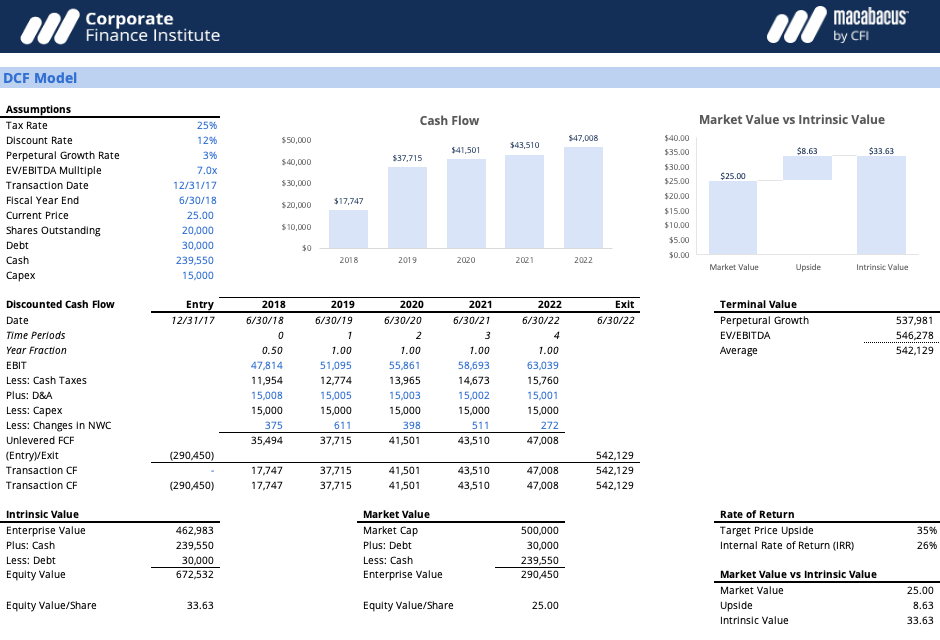
This DCF Excel template includes a fully linked three-statement model, a 5‑year unlevered free cash flow (FCFF) forecast, a separate assumptions tab, and an automatically calculated valuation summary table. It’s pre‑built with key drivers like revenue growth, margins, working capital, and capex so you can plug in your own case and see the impact on free cash flow and enterprise value in seconds.
To customize the template, adjust the blue‑shaded input cells for items such as revenue growth, operating margin, tax rate, capex, and working capital days; the model will roll these through to FCFF, WACC, and valuation outputs. You can add or remove line items as needed for your business (for example, new revenue streams or expenses) while keeping the core formulas intact.
The model lets you calculate terminal value using both the perpetual growth method and the exit multiple method, so you can pick the approach that best fits your case. Use the perpetual growth method when the business is expected to grow at a stable, long‑term rate, and use the exit multiple method when you want to anchor value to market trading or transaction multiples at the end of the forecast period. In practice, many analysts calculate terminal value using both approaches, then cross‑check the results to confirm their DCF assumptions are reasonable.
Below is a preview of the DCF model template:
The first step in the DCF model process is to build a forecast of the three financial statements, based on assumptions about how the business will perform in the future. On average, this forecast typically goes out about 5 years. The forecast has to build up to unlevered free cash flow (free cash flow to the firm or FCFF).
We continue walking through the DCF model steps with calculating the terminal value. There are two approaches to calculating a terminal value: perpetual growth rate and exit multiple.
In step 3 of this DCF walk through it’s time to discount the forecast period (from step 1) and the terminal value (from step 2) back to the present value using a discount rate. The discount rate used is typically the company’s weighted average cost of capital (WACC).
The best way to calculate the present value in Excel is with the XNPV function, which can account for unevenly spaced out cash flows (which are very common).
Connect what you just learned to a clear career path with CFI’s role‑based courses and certification programs.
For more resources, check out our business templates library to download numerous free Excel modeling, PowerPoint presentations, and Word document templates.