Applied AI for Finance Certification
Build practical AI skills across finance workflows, deliver defensible analyses, and earn a verifiable credential that demonstrates your AI capabilities.
Every quarter brings a flood of financial data from earnings reports, SEC filings, management discussions, and market analyses. Company annual reports often span hundreds of pages, with important details buried in footnotes. Even experienced financial analysts can struggle to process all the data.
AI for financial statement analysis is the use of artificial intelligence to automate the extraction, calculation, interpretation, and modeling of data from balance sheets, income statements, and cash flow statements. AI lets you extract data, calculate ratios, spot trends, and summarize MD&As and footnotes. But as the analyst, you remain responsible for selecting the analytical framework, verifying calculations, and interpreting the findings.
This guide explains how to analyze financial statements with AI, evaluate its findings, and verify the accuracy of its outputs.
Using AI tools for financial statement analysis is like having tireless, super-fast research assistants that read thousands of pages of 10-K filings, earnings reports, and spreadsheets in seconds. However, just like an eager junior analyst, it needs human supervision to catch mistakes and verify complex details.
AI assistants:
As you learn how to use AI in finance, start by identifying which financial analysis tasks AI can handle and which results you’ll need to verify.
Artificial Intelligence (AI) reduces the manual work involved in organizing financial data, reviewing lengthy documents, and performing calculations. You can use it to extract figures and notes from financial filings, then review the results for accuracy and consistency. With time saved from using AI, you can focus on interpreting your analytical results, investigating the drivers, and communicating findings to investors, clients, or management.
AI analyzes the income statement, balance sheet, and cash flow statement and identifies relationships across the three financial statements. You can use AI tools to generate formulas, calculate changes, identify trends and anomalies, and draft preliminary commentary.
The following applications cover financial data extraction, profitability, liquidity, cash generation, narrative summaries, and potential red flags in AI for financial statement analysis.
AI can extract financial figures from SEC filings, Form 10-Ks, earnings call transcripts, and data rooms. It can convert PDF tables into Excel-ready formats and extract line items such as revenue, total assets, and operating cash flow across multiple years or filings.
However, extraction errors can affect your analysis. OpenAI cautions that ChatGPT may struggle to pull exact values from scanned documents, image-based tables, or complex layouts.
That makes reviewing AI-extracted financial data critical. Always confirm that:
AI can analyze changes in a company’s revenue, expenses, and profitability. Large language models (LLMs) like Claude can calculate variances and profitability ratios and assist with vertical analysis.
For example, you could ask Claude to review three years of income statements, calculate annual operating margins, and identify the largest contributors to the decline in operating profitability.
Before relying on AI-generated findings, check that:
AI assists with analyzing a company’s financial position, liquidity, and debt obligations using the balance sheet. You can also perform calculations for working capital, liquidity ratios, leverage ratios, and changes in account balances with AI assistance.
These calculations help identify potential concerns, such as receivables growing faster than revenue, rising inventory balances, or increasing debt. For example, you could ask an AI to compare two years of balance sheets, calculate changes in working capital and key ratios, and identify significant movements that affect liquidity and leverage.
Before relying on AI-generated findings, check that:
AI allows you to analyze cash flows from operating, investing, and financing activities to understand how a company generates and uses cash. You can calculate changes in operating cash flow, capital expenditures, and free cash flow, and examine debt issuance, repayments, dividends, and share repurchases.
This analysis also helps identify factors affecting cash generation, including changes in working capital. For example, you could ask AI to compare three years of cash flow statements, identify the largest changes in operating cash flow, and investigate why cash flow declined despite increasing revenue.
Before relying on AI-generated findings, check that:
AI allows you to examine relationships across financial statements, such as how revenue growth affects accounts receivable, working capital, and operating cash flow. You can also compare net income to operating cash flow to assess how capital expenditures, borrowing, and financing decisions affect multiple financial statements.
Using AI for financial statement analysis may reveal inconsistencies or unusual relationships among reported earnings, balance sheet changes, and cash movements. For example, you could ask AI to investigate why net income increased while operating cash flow declined, examining all three financial statements for potential explanations.
Before relying on AI-generated findings, check that:
AI can summarize lengthy disclosures in the MD&A and financial statement notes, helping you locate information about revenue recognition, debt terms, and contingencies.
For example, you could ask AI to review a company’s annual report, summarize debt-related disclosures, and provide page references for each finding. This reduces the need to manually search through hundreds of pages.
When you use AI to create executive summaries or research overviews, check that:
AI can scan multiple years of financial statements to identify unusual patterns and potential warning signs. AI-assisted analysis may also flag one-time gains, restructuring charges, and unusual accounting adjustments that could distort reported performance.
For example, you could ask AI to review three years of financial statements, identify the five most significant anomalies, and provide supporting calculations for each.
Before relying on AI-generated findings, check that:
AI tools for financial statement analysis offer different capabilities for extracting financial data, performing calculations, and reviewing disclosures. The options include generative AI assistants, AI add-ins in spreadsheet applications, custom AI assistants, and specialized financial AI platforms.
Large language models (LLMs) offer a flexible starting point. ChatGPT, Claude, and Gemini all allow you to upload financial statements, SEC filings, and spreadsheets. You can ask questions about the data, extract tables, calculate financial ratios, compare reporting periods, and summarize disclosures.
If you’re comparing ChatGPT vs. Claude vs. Gemini, focus on file limits, document processing, and analytical features:
Regardless of which assistant you use, verify extracted figures, calculations, and summaries against the original financial statements. Features and file limits vary by plan and workspace settings. For confidential financial information, use only company-approved tools.
If your financial data is already in Excel or Google Sheets, AI tools allow you to build ratio tables, write formulas, create charts, and explain calculations. These integrations let you analyze and edit financial data directly in your spreadsheet without uploading it to a separate AI assistant.
Start with an AI tool compatible with your company’s spreadsheet software and approved AI plans. Always verify AI-generated formulas, calculations, and workbook changes.
Custom AI assistants let you save instructions, reference files, and output formats for consistent financial statement analysis. You can reuse the same process across companies and reporting periods without rewriting your prompts.
For example, you could save an analysis prompt sequence, specify ratio definitions, and require a consistent reporting format with page citations to the original filings. You can then reuse these instructions for new companies or reporting periods, verifying each analysis for accuracy.
Specialized financial AI platforms support teams that analyze large volumes of financial data, require audit trails, access licensed financial information, or have enterprise security requirements. Typically purchased at the team or firm level, these platforms fall into three categories:
Clear, structured prompts tell AI what to analyze, which financial data to use, and how to present the results. The RCCFS framework provides five components for writing financial statement analysis prompts: role, context, constraints, format, and self-check.
| Role | Establish the financial expertise or perspective AI should adopt. | Ask AI to act as a financial analyst reviewing a company’s financial statements. |
| Context | Provide the background needed for the analysis. | Specify the company, reporting periods, financial statements, and an analytical objective. |
| Constraints | Set boundaries for the analysis. | Define permitted data sources, required calculations, and how to handle missing information or unsupported explanations. |
| Format | Specify how results should be presented. | Request a financial ratio table followed by a concise explanation of key findings. |
| Self-Check | Instruct AI to review its work. | Ask AI to verify calculations, reconcile figures to source statements, and flag discrepancies or assumptions. |
Including a self-check can help catch errors, but you still need to independently verify AI-generated calculations and findings against the original financial statements.
Suppose you want to understand how a company’s profitability has changed over three years. The following prompt uses RCCFS to guide the analysis.
Example Prompt
ROLE
Act as an experienced financial analyst reviewing a company’s profitability trends.
CONTEXT
I will provide three years of income statements and relevant MD&A commentary. Analyze how the company’s profitability has changed over this period.
CONSTRAINTS
– Calculate gross profit margin, operating profit margin, and net profit margin for each year.
– Compare the ratios across all three years and identify significant trends or changes.
– Use the supplied MD&A commentary to explain the factors contributing to those changes.
– Use only the information provided. Do not invent missing figures or explanations. Distinguish documented drivers from possible explanations.
FORMAT
Present a table showing each profitability ratio for all three years. Follow it with a concise summary of the major trends, documented drivers, and implications for profitability.
SELF-CHECK
Recalculate all ratios and verify the figures against the source income statements. Confirm that explanations are supported by the MD&A and flag discrepancies, missing information, or unsupported conclusions.
[Insert financial statements and MD&A commentary]
AI’s self-check may catch errors, but you still need to independently verify the calculations and conclusions against the original financial statements.
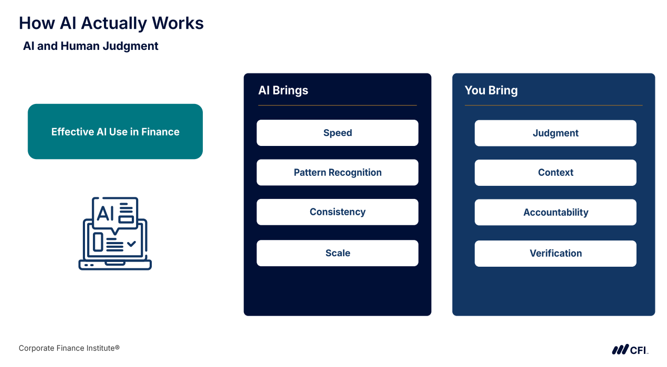
Financial statement analysis starts with preparing financial data for AI, setting clear analytical objectives, and carefully verifying. The following best practices can help you maintain accuracy, consistency, and data security throughout your analysis.
| Prepare Your Data |
|
| Structure Your Analysis |
|
| Validate Results |
|
| Maintain Security |
|
| Improve Your Process |
|
Your financial expertise remains essential for evaluating AI-generated findings, investigating discrepancies, and determining whether the conclusions are supported by the underlying data.
AI can produce convincing financial analyses even when the figures or explanations are incorrect. Researchers behind the FAITH framework emphasize that even minor numerical errors can undermine financial decisions and regulatory compliance.
Here are five limitations to watch for when using AI for financial statement analysis:
The key distinction is that AI supports financial analysis rather than replacing the expertise of human finance professionals.
Before relying on AI-generated financial analysis, complete these five checks:
Developing practical skills in AI for finance can strengthen your qualifications for promotion, help you compete for new finance roles, or support a move into a more analytical position. According to PwC’s 2026 Global AI Jobs Barometer, jobs requiring AI skills commanded an average wage premium of 62% and grew 69%, compared with 9% across the overall labor market.
CFI’s AI Finance Professional (AIFP) Certification provides practical exercises in financial statement analysis, scenario planning, risk assessment, and workflow automation. You can complete the training at your own pace, with no prerequisites or coding experience required. Upon completion, you’ll earn a digital certificate in AI for finance to share on LinkedIn and include on your resume.
Develop your AI financial analysis skills with CFI and take the next step in your finance career.
See all Artificial Intelligence resources
See all Financial Modeling resources
AI can accurately extract financial data, calculate ratios, and summarize filings, but results depend on the quality of the source documents and how carefully you verify the output. Errors can occur when AI misreads scanned tables, uses incorrect reporting periods or units, or generates figures that don’t appear in the original statements. Before relying on AI-generated analysis, confirm that financial figures and totals match the source filing and independently recalculate key ratios.
There is no single best AI tool for financial statement analysis. The right choice depends on your analytical task, whether you’re working with financial filings or spreadsheets, and whether the data is confidential.
It depends on the sensitivity of the financial data. Public filings, such as 10-Ks and annual reports, generally pose fewer confidentiality risks because the information is already publicly available. However, nonpublic company financial statements and confidential client data should only be uploaded to AI tools approved by your organization. Before uploading any nonpublic information, check your company’s data handling policies and the AI tool’s privacy and data settings.
To analyze a 10-K with AI, break the analysis into specific steps instead of requesting one broad conclusion. Specify the reporting periods, financial statements, and units (thousands or millions), and request page citations for key figures and findings.
No, you don’t need coding skills to use AI for financial statement analysis. General AI assistants like ChatGPT, Claude, and Gemini, along with Microsoft Copilot in Excel, let you request calculations, analyze financial data, and summarize findings using plain-language prompts. Tools like ChatGPT may run Python code behind the scenes to perform calculations, but you don’t need to write the code yourself. However, you still need to review AI-generated calculations and verify their accuracy.