AI for Finance Specialization
Use AI to streamline financial analysis, automate workflows, and enhance decision-making.
Finance professionals increasingly ask how to use AI in finance without compromising financial accuracy or sensitive data. Effective use depends on the task, data quality, and financial expertise applied to the output.
Artificial intelligence is now part of many finance workflows. According to Gartner, 59% of finance leaders reported using AI in their finance function in 2025. McKinsey also found that 44% of CFOs use generative AI across more than five use cases.
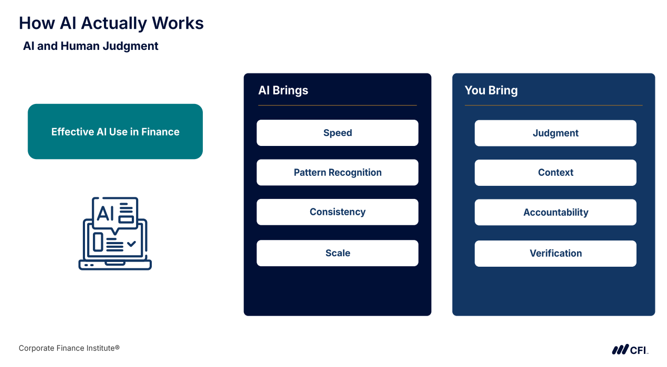
This guide covers the main types of AI tools, AI use cases in finance, a structured process for getting started, guardrails for trustworthy outputs, and developments worth tracking. AI works best when you provide the financial context and judgment needed to turn its output into reliable analysis.
Artificial intelligence includes multiple types of models and tools. Understanding their differences helps you choose the right tool for a finance task and determine how closely to review its output.
| Automation | Follows predefined rules to complete repetitive tasks, such as robotic process automation | Matching invoices with purchase orders |
| Machine Learning | Identifies patterns in historical data to make predictions or detect unusual activity. | Flagging unusual transactions for review |
| Generative AI | Creates text, code, or summaries from prompts and supporting information | Creating variance commentary or Excel formulas |
| Agentic AI | Plans and executes multi-step tasks across tools or systems with limited human input | Coordinating parts of a month-end close |
The most useful AI applications depend on your role. In a 2026 KPMG survey of global finance leaders, 64% cited a lack of clear, role-specific AI use cases as an obstacle to AI training.
Among finance functions already using AI, Gartner identified the leading use cases as knowledge management (49%), accounts payable process automation (37%), and error and anomaly detection (34%). The following examples show how to apply AI to specific finance tasks, what data to provide, and what to verify before using the results.
FP&A analysts can use AI for sales forecasting, testing assumptions through scenario analysis, identifying material budget-versus-actual variances, and drafting management commentary.
For example, you can use AI for financial analysis to review monthly budget-versus-actual results. A structured prompt provides the business context, reporting period, materiality threshold, and financial data needed for the analysis.
Example Prompt
You are an FP&A analyst reviewing monthly budget-versus-actual results. Using the data below, identify the largest material variances. Calculate the dollar and percentage differences, classify each as favorable or unfavorable, and explain likely drivers using only the information provided.
Present the results in a table and provide a brief executive summary of the largest variances and potential causes. Flag explanations requiring further investigation.
[Insert budget and actual data]
AI may identify an expense category that exceeded budget by 12%, but the data alone may not establish whether headcount, pricing, timing, or another factor caused the variance. Treat unsupported explanations as hypotheses until verified.
What to Check:
Corporate financial analysts can use AI to review financial statements, identify performance trends, calculate ratios, and prepare management reports. Applications of AI in financial statement analysis include horizontal analysis, which compares results across periods, and financial ratio analysis, which evaluates relationships between financial figures.
For example, you can provide data from income statements, balance sheets, and cash flow statements from multiple periods and ask AI to analyze financial performance.
Example Prompt
You are a corporate financial analyst conducting horizontal and financial ratio analysis to evaluate a company’s financial performance.
I will provide income statement, balance sheet, and cash flow statement data for the following periods:
[Insert reporting periods]
Calculate these ratios:
[Insert selected ratios]
Then:
Present the results in a concise table with supporting calculations, followed by a summary of key findings for management.
[Insert financial statement data]
What to Check:
For example, AI may show that operating margin declined because expenses grew faster than revenue, but the statements alone may not explain why expenses increased. Once you’ve verified the findings, you can also use AI to create executive summaries for management.
Corporate accountants can use AI for recurring month-end tasks such as reviewing and reconciling general ledger data, preparing account data for variance analysis, and drafting journal entry descriptions and accounting memos. You can also use AI prompts for accounting to flag transactions recorded in the wrong accounts.
For example, you can provide general ledger (GL) data, the chart of accounts, and relevant accounting policies to identify potentially misclassified revenue or expenses and calculate proposed reclassifications.
Example Prompt
You are an experienced corporate accountant reviewing a general ledger for classification accuracy and mathematical reconciliation.
I will provide:
Identify potentially misclassified revenue and expense transactions. For each flagged transaction:
Calculate the exact difference between original and corrected revenue and expense totals.
Do not invent missing policies, transaction details, or account classifications. Distinguish verified calculations from accounting judgments or assumptions.
[Insert GL data below]
What to Check:
AI agents for accounting execute multiple-step processes, and AI agents for month-end close automation help reduce repetitive work by coordinating connected tasks. Accountants remain responsible for checking the results and approving changes.
Treasury professionals can use AI to monitor daily cash positions and plan short-term liquidity and funding across accounts, entities, and currencies. According to a Crisil Coalition Greenwich survey of treasurers at large corporations, 64% use or plan to use AI for cash forecasting and management.
For example, you can use AI prompts for finance to forecast short-term cash balances and identify potential liquidity gaps.
Example Prompt
You are a treasury professional reviewing the company’s short-term cash position.
I will provide:
Forecast cash balances for the following period:
[Insert forecast period]
For each date or period, calculate the projected closing cash balance and identify major inflows and outflows. Flag when projected liquidity falls below the specified threshold.
List the forecast assumptions and flag missing information that could materially affect the results.
[Insert cash and financing data]
What to Check:
Finance professionals use risk assessment with generative AI to identify potential threats. AI and machine learning can also help monitor transactions, detect anomalies, and support know your customer (KYC) checks. Gartner found that 34% of finance functions using AI apply it to error and anomaly detection.
AI agents for KYC automation can review customer information and flag missing or inconsistent data. For transaction monitoring, you can also use AI to flag unusual activity against defined risk criteria.
Example Prompt
You are a financial risk analyst reviewing transactions for unusual activity.
I will provide:
Review the transactions against the supplied risk criteria. For each flagged transaction:
Present the findings in a table organized by risk level. Do not treat flagged transactions as confirmed fraud or invent missing information.
[Insert transaction data and risk criteria]
What to Check:
Equity research analysts can use AI to review company filings, summarize earnings calls, compare financial performance, and track changes in management guidance. AI agents for market research can organize public information and identify developments affecting forecasts or investment decisions. AI can also compare results with expectations, build initial peer lists, and test valuation assumptions.
For example, you can use AI prompts for stock analysis to review earnings call transcripts for information relevant to your investment thesis.
Example Prompt
You are an equity research analyst reviewing [COMPANY NAME]’s Q3 2026 earnings call transcript.
I will provide:
Identify:
Support each finding with a short quote and timestamp or page reference.
Distinguish management’s statements from your interpretation. If prior guidance is unavailable, do not claim it changed unless the transcript explicitly establishes the change.
[Insert transcript below]
What to Check:
Excel formula writing is a practical way to learn how to use AI in finance. Describe the relevant columns in your worksheet and the result you want, then ask AI to generate a formula and explain how it works.
Example Prompt
You are helping me write an Excel formula for a finance workbook.
My worksheet is structured as follows:
I want to calculate:
[Describe the desired result]
Provide the Excel formula I should use and explain in plain English how each part of the formula works. If the formula depends on a specific Excel version or function, state that clearly.
Test the formula on a few rows with known results before applying it to the full dataset. Check for incorrect cell references, ranges, and calculation logic that could affect your analysis.
To start using AI in finance, choose a specific finance task, prepare the data, write a clear prompt, verify the output, and document what works before expanding its use. This five-step process gives you a repeatable approach to using AI in your daily finance work.
Choose a routine finance task that’s easy to verify, such as generating Excel formulas with a large language model (LLM). For example, to calculate an investment’s internal rate of return (IRR) with irregularly timed cash flows, you could use this prompt:
I need an Excel formula to calculate a project’s IRR. Cash flows are in C5, with corresponding dates in B5. Use a starting estimate of 10%.
The resulting formula should look like this:
=XIRR(C5:C12, B5:B12, 0.1)
The formula uses:
C5:C12 for cash flows, including the initial investment (typically negative).
B5:B12 for the corresponding cash flow dates.
10% as an initial estimate for IRR.
Test the formula against known results and correct any errors before using AI for more complex finance tasks.
Preparing financial data for AI helps reduce errors and improve the reliability of AI outputs. Before using financial data with AI:
Treat an AI model like a capable but inexperienced analyst. It can process information quickly, but it needs clear instructions about your business context, requirements, and assumptions.
Include five elements in your finance prompts:
These instructions help AI produce more relevant results and distinguish findings supported by the source data from assumptions requiring review.
Even with clean data and clear prompts, AI can produce incorrect calculations, unsupported conclusions, or inaccurate source details. MIT Sloan notes that large language models can present incorrect answers with confidence.
Before relying on AI results, verify AI results against the source data:
Every material conclusion should have supporting data, calculations, or other verifiable evidence.
Once an AI-assisted task works reliably, document the process so you or your team can repeat it. Save effective prompts in a shared library, along with instructions for preparing the data, running the prompt, and verifying the expected results. A coworker should be able to follow the workflow without additional guidance.
Before expanding your AI usage, test the workflow over several cycles and measure the time saved. McKinsey reports that finance professionals using AI tools spend 20% to 30% less time on data analysis. To assess whether your workflow delivers similar benefits, compare the time required to complete the task before and after introducing AI.
AI can repeat the same error across multiple reports or analyses if finance teams use it for more tasks without checking the results. Incorrect outputs, weak controls, and mishandled data can affect financial reporting and decision making.
Data security is another concern. According to KPMG, 50% of finance leaders are concerned about cyber and AI-native security threats. Key safeguards include human oversight, checking for inaccurate or biased outputs, protecting confidential data, and documenting AI conclusions and their sources.
AI assists with routine finance tasks, but finance professionals should retain final authority over decisions affecting financial records, cash, or reported information.
Human oversight means reviewing AI outputs, challenging assumptions, and approving or rejecting proposed actions. You should also be able to explain the inputs, instructions, results, verification checks, and who made the final decision.
Some actions should always require human approval:
An AI hallucination occurs when a model generates a figure, fact, source, or explanation that appears credible but lacks evidence. In finance, polished wording and precise numbers can make incorrect answers seem reliable.
Watch for these warning signs:
Investigate unsupported figures or claims before using them in financial analysis, reporting, or decisions.
Protecting sensitive information starts with using the right AI tool. Before using AI for finance work, check that your company has approved the tool for the task and data involved. Never enter client data, personal information, or material nonpublic information into public or unapproved AI tools.
You can also reduce risk by limiting what you share. Remove or mask identifying details when possible and consider whether aggregated data would be enough. For example, a regional revenue summary may provide what you need without exposing individual customer records.
It’s also worth checking the AI provider’s data-handling policies, including whether the provider stores prompts or uploaded files, how long that information is retained, and whether your data may be used for other purposes.
AI models can reflect biases in their training data and other inputs, making lending and credit scoring particularly sensitive applications. The EU Artificial Intelligence Act, Annex III classifies certain AI systems used to assess creditworthiness or establish credit scores as high-risk because they can affect access to financial services.
Explainable AI helps finance professionals understand which data and factors influenced an AI-supported result. For high-stakes decisions, you should be able to explain the reasoning, question the findings, and investigate potential bias.
AI capabilities are changing quickly, but you don’t need to follow every model or product release. Focus on developments that could change how you complete, review, or control your daily work.
Unlike tools that respond to individual prompts, AI agents in finance can carry out multi-step tasks across systems with minimal human input. McKinsey identifies applications such as managing parts of the accounting close, gathering information from multiple sources, running checks, and drafting complex reports.
A KPMG survey found that 50% of finance leaders plan to develop or coordinate systems involving multiple AI agents. Finance teams need clear rules about which actions require human approval. Errors early in a process can affect later steps, making review points essential.
AI is increasingly built into spreadsheets and enterprise systems, so you may not need a separate tool. Copilot in Excel can help build discounted cash flow (DCF) models, analyze variances, and connect to financial data sources such as FactSet and S&P Global. Google Sheets also offers an AI function for summarizing and categorizing data.
SAP Joule agents can support accounts receivable, dispute resolution, and financial close tasks. Oracle NetSuite offers AI tools for monitoring the close, matching bank transactions, and analyzing financial fluctuations.
Features and availability vary by product and plan. You’ll still need clean data, clear instructions, and independent verification of AI results.
Large reasoning models are designed to work through multi-step problems before producing an answer. In finance, they can help with analyses involving connected calculations, assumptions, and comparisons. For example, a reasoning model can compare financial scenarios or trace how changes in one assumption affect subsequent results. This can make complex analysis easier to organize and review.
However, a reasoning model’s ability to handle complex analysis doesn’t guarantee accuracy. Finance professionals still need to verify calculations, assumptions, and conclusions against the underlying data.
As AI plays a larger role in financial decisions, accountability becomes increasingly important. MIT Sloan notes that regulators often struggle to verify how AI-supported decisions are made in areas such as credit scoring, trading, and fraud detection.
Regulations are also shaping AI use. The EU AI Act classifies certain systems used to assess creditworthiness or establish credit scores as high-risk, except those used to detect financial fraud.
Independent assurance helps organizations evaluate their AI systems and controls. According to KPMG, 94% of surveyed organizations rely on third-party assurance providers.
As oversight increases, document how AI is used and maintain an audit trail of important inputs, outputs, reviews, and approvals. Follow your organization’s AI policies and make sure you can explain how AI contributed to a result and who approved it.
Understanding how to use AI in finance requires the financial judgment to choose appropriate tasks, question results, and determine when an analysis is ready to use. These skills remain a challenge for finance professionals.
Building practical AI skills for finance can help you spend less time on repetitive data work and more time interpreting results, investigating important findings, and advising business partners. With 59% of finance leaders already reporting AI use within their finance functions, professionals who combine AI skills with financial expertise have an opportunity to stand out.
CFI’s AI Finance Professional (AIFP) Certification helps you develop these skills through hands-on practice with realistic finance scenarios. This online program is self-paced, so you can build practical experience around a full-time work schedule without relying solely on video instruction.
Join CFI and take the AI for Finance Specialization to build the skills to use AI confidently and responsibly across finance workflows.
See all Artificial Intelligence resources
Start with one narrow, repeatable task in your own work that is easy to verify. Use a company-approved AI tool, prepare clean and clearly structured data, and give the model specific instructions. Before relying on the result, compare important figures and conclusions with the original source. Once the workflow performs reliably, you can gradually apply AI to more complex finance tasks.
According to Gartner, the most common AI use cases among finance functions using AI are knowledge management at 49%, accounts payable process automation at 37%, and error and anomaly detection at 34%. Other common applications include forecasting and variance analysis in FP&A, reconciliations and the close in accounting, invoice processing in AP, fraud detection in risk, and research summaries in investment research.
Current evidence shows AI changing how finance professionals spend their time. McKinsey found that finance professionals using AI tools spend 20% to 30% less time on data analysis, creating more capacity for business partnering. As AI changes finance jobs, people still provide the financial judgment, review, and accountability required for important decisions.
It depends on the tool and your company’s data policies. Avoid entering confidential, client-identifying, or material nonpublic information into any AI tool your organization has not approved. Use approved enterprise tools when available, anonymize or aggregate sensitive data when possible, and understand how the provider stores, retains, or uses the information you enter.
AI can be fast and useful for financial analysis, but it can still produce confident answers that are wrong. Verify every important output against the source data before relying on it. Compare the key totals to the original file, independently recalculate a sample of figures, and ask AI to show the supporting calculations or intermediate steps behind its conclusions.
The core skills are preparing clean data, writing structured prompts, verifying AI-generated output, and applying financial judgment to interpret the results. Hands-on practice also matters. KPMG found that 61% of finance leaders cite a lack of hands-on practice environments as an obstacle to AI training. Working through realistic finance scenarios helps professionals apply these skills to the workflows they handle on the job.