Get Certified for
Commercial Banking (CBCA®)
Stand out and gain a competitive edge as a commercial banker, loan officer, or credit analyst with advanced knowledge, real-world analysis skills, and career confidence.
This Excel template calculates the debt service coverage ratio in two ways: using standard EBITDA and using EBITDA minus capex. It is designed for analysts who need a pre-built model for evaluating a company’s debt service capacity.
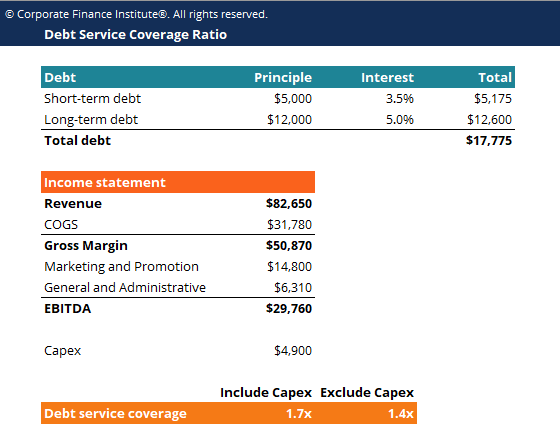
There are two ways to calculate the debt service coverage ratio:
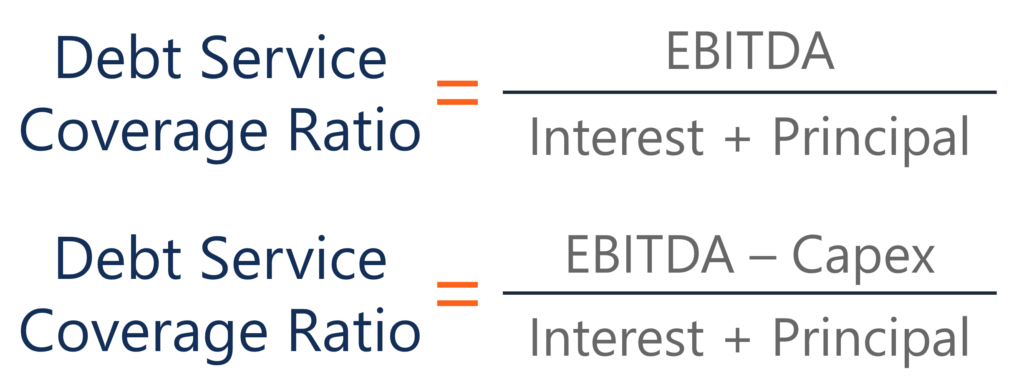
The template calculates DSCR using two variations of the debt service coverage ratio formula:
Standard: DSCR = EBITDA / (Principal + Interest + Cash Taxes)
Capex-adjusted: DSCR = (EBITDA – Capex) / (Principal + Interest + Cash Taxes)
Some companies might prefer to use the latter formula because capital expenditure is not expensed on the income statement but rather considered as an “investment”. Excluding Capex from EBITDA provides the company with the actual amount of operating income available for debt repayment.
This template gives analysts a ready-made model for calculating both the standard and capex-adjusted DSCR, making it easy to evaluate any borrower’s debt capacity against standard lender thresholds. For analysts looking to deepen their credit skills, CFI’s Commercial Banking & Credit Analyst (CBCA) certification covers loan structuring, credit analysis, and financial modeling end to end.
For more resources, check out our business templates library to download numerous free Excel modeling, PowerPoint presentation, and Word document templates.