Get Certified for Financial Modeling (FMVA)®
Gain in-demand industry knowledge and hands-on practice that will help you stand out from the competition and become a world-class financial analyst.
Debt Service Coverage Ratio (DSCR) measures the ability of a company to use its operating income to repay all its debt obligations, including repayment of principal and interest on both short-term and long-term debt. DSCR is often used when a company has any borrowings on its balance sheet, such as bonds, loans, and lines of credit. It is also a commonly used ratio in a leveraged buyout transaction to evaluate the debt capacity of the target company, along with other credit metrics such as total debt/EBITDA multiple, net debt/EBITDA multiple, interest coverage ratio, and fixed charge coverage ratio.
This debt service coverage ratio template, built in Excel, will help you calculate the debt service coverage ratio, both including and excluding capex.
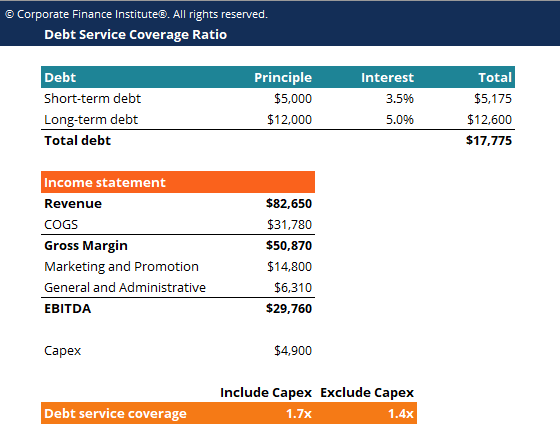
Click the button below to download CFI’s free Debt Service Coverage Ratio template!
There are two ways to calculate the debt service coverage ratio:
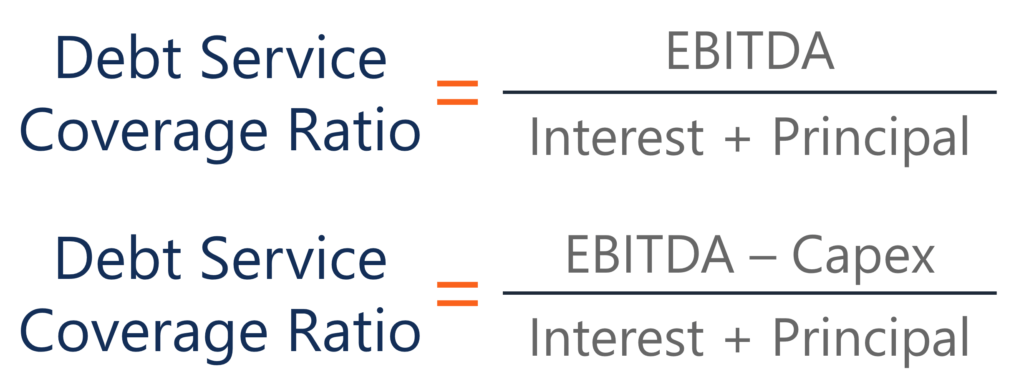
Where:
Some companies might prefer to use the latter formula because capital expenditure is not expensed on the income statement but rather considered as an “investment”. Excluding Capex from EBITDA provides the company with the actual amount of operating income available for debt repayment.
For more resources, check out our business templates library to download numerous free Excel modeling, PowerPoint presentation, and Word document templates.